
UnseenChat: View Deleted Msgs
Afex AICommunication
3.924.00 Reviews
- Version
- 24.0
- Installs
- 500.00K
- Age Rating
- Everyone
Screenshots
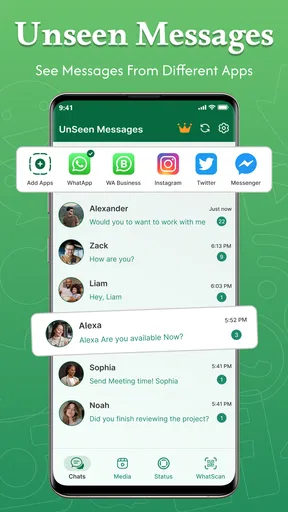
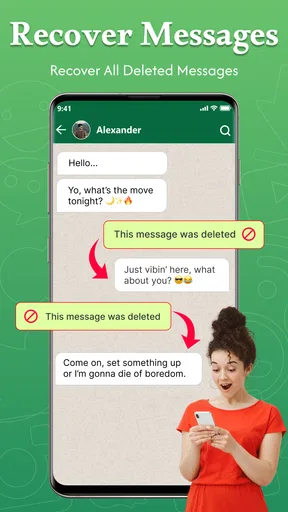
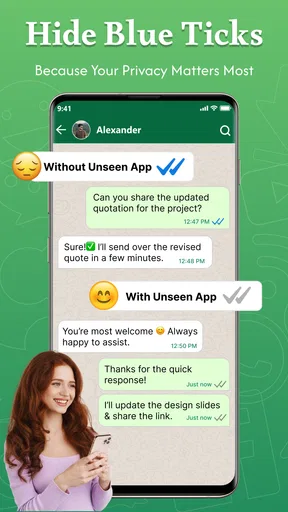
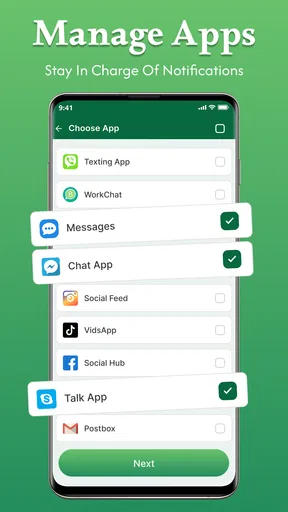
Our Review of UnseenChat: View Deleted Msgs
 Analysis by Appyee
I spent time with UnseenChat: View Deleted Msgs as a communication app, and my first impression was that it is built for a very specific kind of everyday frustration: noticing a message has disappeared, or wanting to read a chat without immediately showing that it has been opened. The appeal is easy to understand, especially for people who receive a lot of messages and do not always have the time or emotional energy to reply straight away.
The app comes from Afex AI and is free to install, with optional in-app purchases ranging from $4.99 to $17.99 per item. It is rated for Everyone, works from Android 7.0 onward, and its current version is 24.0. Those details make it accessible to many older Android phones, although the actual experience still depends on how well a device handles background activity and notifications.
How UnseenChat fits into daily messaging
The central idea is simple: UnseenChat works alongside normal messaging habits rather than trying to replace a chat service. Its main tools are aimed at viewing incoming messages without a blue tick, checking deleted-message content when the app has already captured the relevant notification, and saving status updates. That combination gives it a wider purpose than a single privacy switch, but it also means the app’s usefulness depends heavily on how messages arrive on the phone.
I found the unseen-reading angle most practical in ordinary situations. Imagine receiving a long message while you are in a meeting, commuting, or dealing with family responsibilities. You may want to understand whether it is urgent without opening the original conversation and creating pressure to answer. In that case, reading through UnseenChat can give you a little breathing room. It is not about ignoring people forever; it is about choosing when to engage.
The deleted-message feature is more conditional than the short store summary might suggest. A message cannot be recovered from nowhere. The app needs to have access to the incoming notification before the sender removes the message, and anything that never appeared as a readable notification is unlikely to be available later. This is an important practical distinction, because users may otherwise expect a complete archive of every deleted chat.
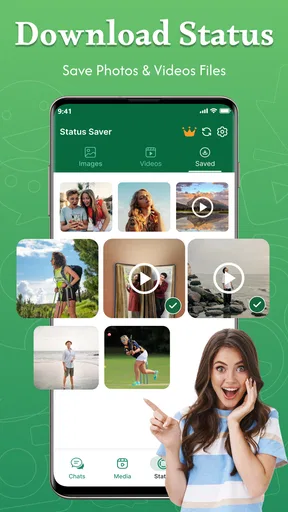
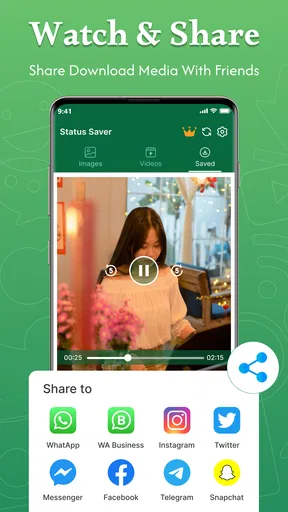
Status saving is useful in a different way. If a friend posts a photo, clip, or update that you want to keep for personal reference, having the saving tool in the same app is more convenient than switching between separate utilities. I would still use it thoughtfully and respect the original poster’s privacy, particularly when the status contains personal images or information.
What feels quick, and what can slow the experience
For its basic purpose, the app should feel quick when it is already running properly in the background and notifications are arriving normally. Opening a captured message is a lighter task than loading a full conversation with media, links, and older history. That makes the app most attractive for quick checks rather than extended chatting.
The important speed trade-off is that background notification handling matters more than raw screen performance. A fast phone cannot help much if the operating system delays, restricts, or removes the app’s background activity. On a device with aggressive battery management, a deleted message may be missed simply because the notification was not delivered to UnseenChat in time. I would therefore judge responsiveness by the whole notification chain, not just by how quickly the app opens.
There is also a difference between text and richer content. Plain message previews are generally easier to process than large images, videos, voice notes, or notifications that have been grouped together. If you receive many media-heavy messages, the experience may feel less immediate because the app has more to interpret and store for later viewing. The app’s concept remains useful, but expectations should be realistic: it is a notification-based companion, not a second copy of every chat account.
Heavy-use moments and practical workflow tips
The app becomes more demanding during busy periods, such as a workday filled with group conversations or an evening when several contacts send frequent updates. In those moments, the value of separating “read now” from “reply now” becomes clearer, but so does the need for organization. I recommend using it as an inbox for triage: check what needs immediate attention, leave non-urgent items for later, and then open the original conversation when you are ready to respond.
A less obvious advantage is that this workflow can reduce accidental social pressure. Reading a message privately gives you time to understand its tone and decide on a thoughtful answer instead of reacting from the notification shade. That is especially helpful with complicated requests, emotionally charged messages, or conversations where a quick reply could be misunderstood.
There is a trade-off, though. If you make UnseenChat your only way of checking messages, you may create a second place to monitor. I would not leave important conversations exclusively in the app. For anything urgent, verify the original messaging service directly, because notification previews can be shortened, grouped, or affected by the sender’s settings and the phone’s own notification behavior.
For deleted-message viewing, the best practical habit is to keep notifications readable enough for the app to process them while avoiding unnecessary notification clutter. If your phone hides message previews completely, there may be less useful content for the app to capture. Conversely, visible previews can expose private text on the lock screen. That is the central privacy compromise: gaining access to unseen or deleted content may require allowing message information to pass through notifications.
Reliability depends on the phone as much as the app
My view of reliability here is more nuanced than a simple “works” or “does not work.” The app’s functions depend on several links: the messaging service must produce a notification, Android must deliver it, the phone must permit background operation, and the message must contain enough preview information to be useful. A failure at any point can make the result incomplete without meaning that the app itself has crashed.
This matters most for deleted messages. If a sender deletes something before the phone receives a notification, there is nothing for the app to preserve. The same applies when a conversation is muted, previews are hidden, notifications are bundled, or the operating system pauses background activity. Users who understand those conditions will probably find the tool more dependable than someone expecting guaranteed recovery.
Stability during normal browsing is a separate question. The app’s focused design should make quick checks straightforward, but heavy notification traffic can expose limitations that are invisible during occasional use. I would treat it as a utility for selected moments rather than something that needs to remain open all day. That approach also reduces the amount of information you are asking a background app to process continuously.
One useful recovery habit is to check Android’s notification settings after installing or updating the app. If the results suddenly become incomplete, the first suspects should be notification access, battery restrictions, muted chats, and hidden previews. This is more productive than immediately assuming that deleted-message recovery has stopped working. Version 24.0 may improve the overall experience for some users, but phone-specific settings still have a major influence.
Older devices and resource expectations
Because the minimum operating system is Android 7.0, UnseenChat is not limited to recent phones. That is good news for people who keep an older handset as a daily device or backup. However, compatibility does not guarantee identical performance. Older hardware may have less memory, slower storage, or stricter background limits, all of which can affect notification-based tools.
I would be particularly careful on phones that already struggle with many active apps. A utility that relies on background access can compete with other services for memory and battery attention. If you notice delayed notifications, missing previews, or the app being closed after a while, review the phone’s battery and background controls before deciding whether the app is unsuitable.
Resource demands are also connected to how much content you receive. Occasional text messages should be a lighter workload than a constant stream of group notifications and media. Status saving can add another layer of storage use, especially if you keep many files instead of clearing items after sharing or viewing them. The sensible approach is to save only what you genuinely need and periodically remove old material from the device.
Privacy-conscious users should think about the device environment as well. A shared phone, an unlocked screen, or visible notification previews can undermine the discretion that makes unseen reading attractive. I would avoid using the feature as a way to inspect someone else’s private conversations without permission. The most defensible use is managing your own incoming messages and your own response timing.
How it compares with ordinary alternatives
The usual alternative is simply to manage read receipts and notification previews within the messaging service itself. That route is cleaner because it keeps everything inside the original app and avoids adding another background utility. If your only goal is to delay a blue tick, the built-in privacy settings may be enough and may be easier to understand.
UnseenChat becomes more interesting when you want several related functions together, particularly unseen reading, notification-based deleted-message viewing, and status saving. A separate status-saver tool might offer a narrower experience, while relying only on the original chat app will not necessarily provide the same way to inspect removed content. The convenience is real, but it comes with more dependence on notification access and more settings to maintain.
I would choose the original messaging app alone for sensitive conversations, business communication, or situations where a complete and authoritative chat history matters. I would consider UnseenChat for casual messaging, busy social groups, and people who want to separate message awareness from immediate replies. That distinction is important: it is a companion for managing attention, not a replacement for the service where the conversation actually lives.
Who will get the most from it
This app is a good match for someone who receives many messages but dislikes the expectation that every opened chat deserves an instant answer. It can also help users who frequently encounter “message deleted” notices and want to see what was available in the notification before removal. People who save status updates for later viewing may appreciate having that function nearby instead of installing several narrowly focused utilities.
It is less suitable for anyone expecting guaranteed recovery, a full backup of conversations, or perfect access to media and voice messages. It is also not the right choice if you are uncomfortable granting notification access or if your phone routinely shuts down background apps. In those cases, the built-in messaging controls are likely to be less frustrating, even if they offer fewer features.
The free entry point makes it easy to test whether the workflow fits your phone. The optional purchases should be considered only after you have confirmed that notifications arrive reliably and that the app solves a real problem for you. I would not pay simply because deleted-message recovery sounds appealing; first check whether your usual chats produce the kind of notifications the app can actually use.
My performance verdict
UnseenChat is a focused communication utility with a sensible everyday purpose, but its performance is best understood as conditional rather than absolute. When notifications arrive promptly and Android allows the app to remain available, quick unseen reading and notification-based message recovery can be genuinely convenient. The status-saving feature adds practical value, particularly for people who want a single place for these related tasks.
Its weaknesses come from the same design that gives it usefulness. Background access, notification previews, battery controls, grouped alerts, and message format all influence the result. That means two users can have noticeably different experiences on different phones. The app is not necessarily slow when something is missed; sometimes the required notification was never available in a usable form.
With an average rating of 3.9 from around 2.4 thousand ratings and more than 500 thousand installs, it has clearly attracted a substantial audience while leaving room for mixed experiences. I would read that as a reason to test it carefully rather than treat it as a universal solution. The app’s Everyone rating makes it broadly approachable, but responsible use still matters because notification content can be personal.
My recommendation is straightforward: try it if your main problem is managing when you read messages, and if you understand that deleted-message viewing depends on notifications being captured in time. Keep the original messaging app as the source of truth, check your Android background settings, and avoid relying on the utility for urgent or sensitive conversations. Used with those limits in mind, it can be a handy buffer between receiving a message and deciding when to answer.
Verdict
Strengths of UnseenChat: View Deleted Msgs
- Recovers deleted text messages from supported chat notifications.
- Simple interface with little setup required.
- Can keep a local history of captured notifications.
- Useful when messages disappear before you can read them.
- Works without needing access to the sender’s account.
Limitations of UnseenChat: View Deleted Msgs
- Cannot recover messages deleted before the app was installed.
- Images, videos, and voice notes may not be restored reliably.
- Requires notification access, creating privacy concerns.
- Messages may be missed when notifications are disabled or restricted.
- Battery optimization can interrupt background message monitoring.
Similar Picks in This Category
View All
Google Messages
Google LLC4.6

Gmail
Google LLC4.1

Google Meet
Google LLC4.4

Google Chrome
Google LLC4.1

WhatsApp Messenger
WhatsApp LLC4.6

Carrier Services
Google LLC4.2
Frequently Asked Questions
What is UnseenChat: View Deleted Msgs and how does it work?
UnseenChat: View Deleted Msgs is designed to help users read certain incoming messages even when they are later deleted from the original chat. It generally relies on notification access to save message previews locally as they arrive. Because of this, it may not recover messages that were deleted before installation, notifications were disabled, or the message content was hidden by the operating system or the messaging app.
Can UnseenChat recover every deleted message from WhatsApp or other chat apps?
No application can guarantee recovery of every deleted message. UnseenChat usually depends on the notification preview generated by the supported messaging application, so its results may vary. Messages sent while the phone is offline, notifications are muted, previews are concealed, media is not fully displayed, or the app is excluded from notification access may not be saved. Compatibility can also change after updates to Android or the supported chat services.
What permissions does UnseenChat: View Deleted Msgs require?
The app may request notification access so it can read and store message notifications, and it may require permission to display content or manage files depending on the features available in your version. These permissions are important to its operation, but they are also sensitive because notifications can contain private conversations, verification codes, and personal information. Review the app’s permission screen and privacy policy carefully before granting access.
Can UnseenChat view deleted photos, videos, voice messages, or stickers?
Its ability to preserve media depends on how the original messaging app delivers notifications and how UnseenChat handles that content. Text previews are generally the most reliable, while photos, videos, stickers, documents, and voice messages may only appear as a notification label or may not be recoverable at all. Media can also fail to save when automatic downloads, storage permissions, battery restrictions, or notification previews are disabled.
Is UnseenChat: View Deleted Msgs safe and private to use?
Before using UnseenChat, consider that notification access can expose the contents of messages from multiple applications. A trustworthy setup should explain how collected information is stored, whether it leaves the device, and how advertising or analytics are handled. Avoid granting access if the privacy policy is unclear, and do not rely on the app for confidential messages. Android settings allow you to revoke notification access whenever you choose.
